> ## Documentation Index
> Fetch the complete documentation index at: https://docs.tryfix.ai/llms.txt
> Use this file to discover all available pages before exploring further.
# Fix AI
> Automate frontend QA testing using AI agents
## Overview
Fix AI is a platform where you can create, edit, and run frontend QA tests. Tests are defined by **user flows**, which are individual journeys users may take to complete a task on your website, such as "create an account", "purchase a product", etc.
To use Fix AI, you first create a flow. That flow can then be run on a set schedule or ad-hoc. Each time a flow is run, a detailed replay of the run with videos of each step being executed along with any bugs that are caught, is visible in the dashboard.
## Creating Flows
With Fix AI, an individual flow consists of a series of interactions that are performed on a website. These steps are defined in natural language. For instance, to test a sign in flow, you might define the following steps:
1. Navigate to sign in page
2. Click the email input field
3. Type in "[fixaibot@gmail.com](mailto:fixaibot@gmail.com)"
4. Click the password input field
5. Type in "password"
6. Click the sign in button
7. Verify that the user is signed in and the internal dashboard is visible
Here's an example of a flow built using Fix AI:
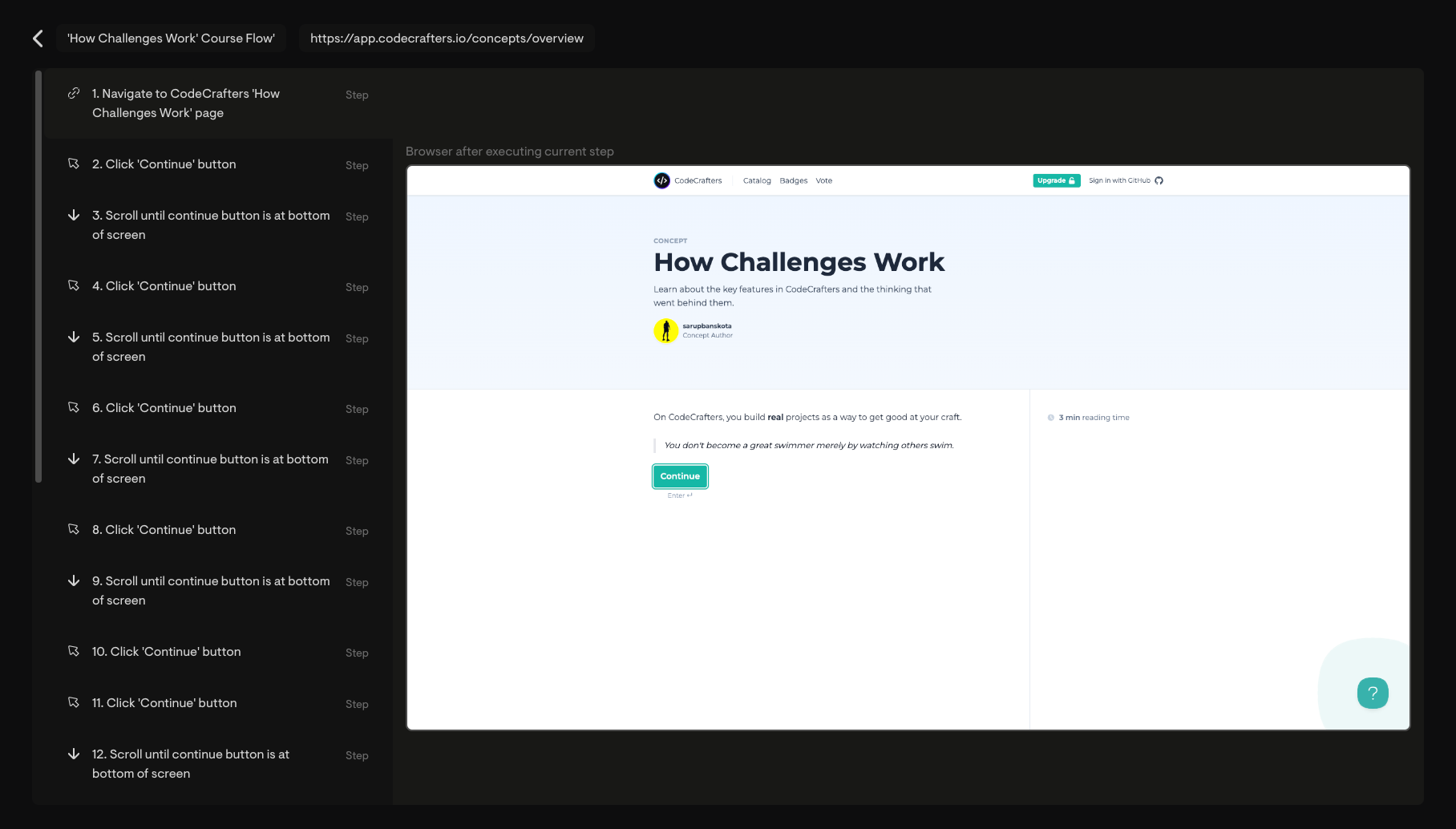 Currently, we provide white-glove onboarding, where we'll build and manage your tests for you. For this reason, the flows page is **not yet
available** by default. For customers who'd like a self-serve experience, we can potentially give you access to the flows page on request.
## Running Flows
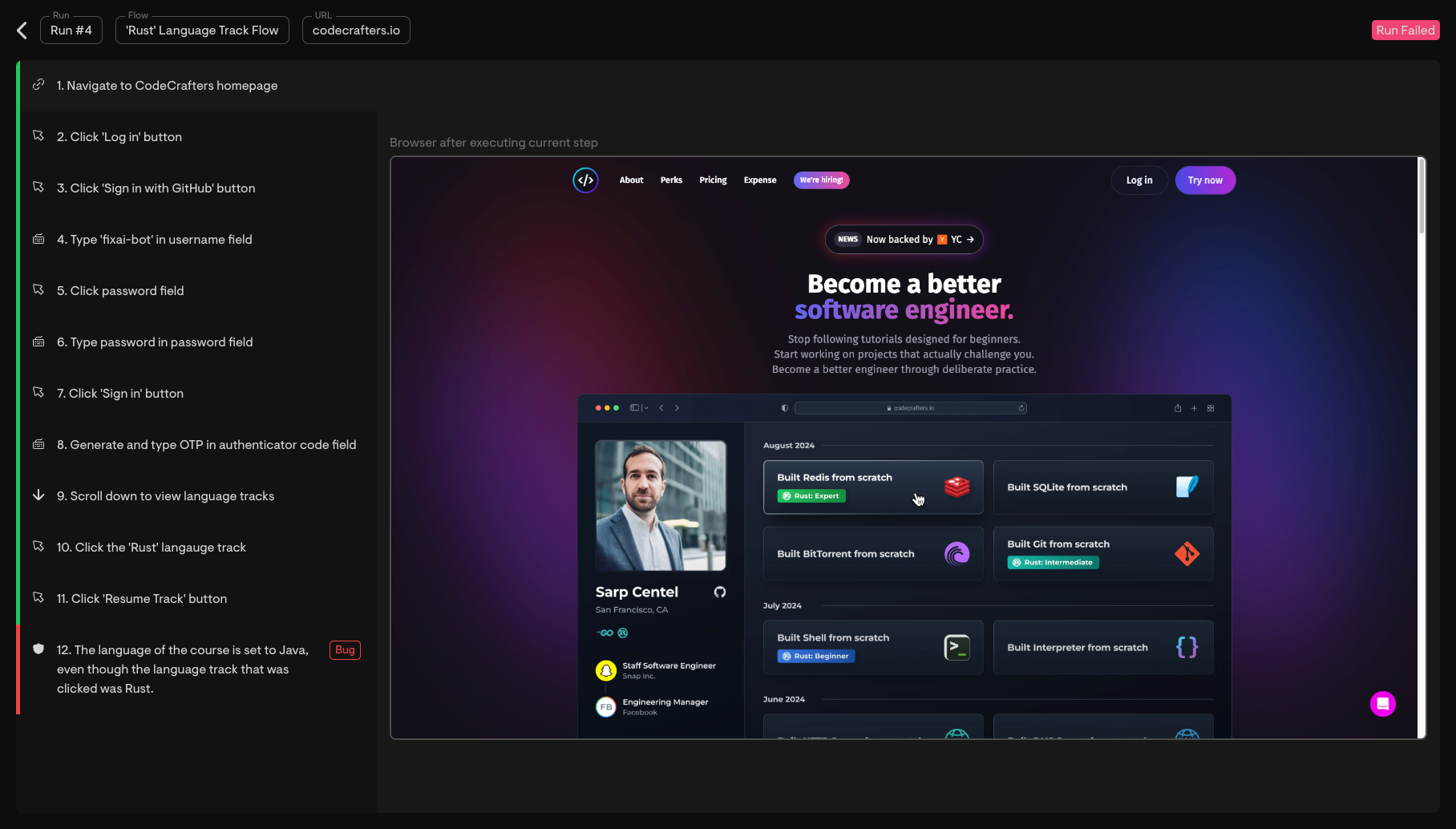
Flows are typically run on a set schedule. Flows can also be individually run via the Fix AI dashboard. When a flow is run, a browser is setup and our agent attempts to execute each step on your website. A video of each step being executed is recorded, and any bugs that are caught are also reported.
After a run completes, it can be viewed on the run replay page. Here is an example of a run on Fix AI:
Currently, we provide white-glove onboarding, where we'll build and manage your tests for you. For this reason, the flows page is **not yet
available** by default. For customers who'd like a self-serve experience, we can potentially give you access to the flows page on request.
## Running Flows
Flows are typically run on a set schedule. Flows can also be individually run via the Fix AI dashboard. When a flow is run, a browser is setup and our agent attempts to execute each step on your website. A video of each step being executed is recorded, and any bugs that are caught are also reported.
After a run completes, it can be viewed on the run replay page. Here is an example of a run on Fix AI:
 ## Bug Reporting
Each time a flow is run, all bugs are reported and captured both on the run replay and on a separate bugs page.
In addition, bugs can be sent to you directly via Slack or Linear. We can also provide additional integrations on request.
## Onboarding Process
We are currently in a private beta and provide custom onboarding for each customer. Here's what to expect:
1. **Flow Planning** - We work with you to create a list of all user flows that need to be tested, typically over Slack or a quick call.
2. **Flow Creation** - We'll build all your flows for you. This process typically takes 1-3 days.
3. **Scheduling Runs** - We'll schedule your flows to run at your preferred cadence.
4. **Ongoing Support** - When new flows are needed or existing flows need changes, we can make those changes for you on an ad-hoc basis. Our turnaround time is typically less than a day.
## Communication and Support
Each customer gets access to a dedicated Slack channel where you can:
* Receive updates as we build and manage your flows
* Get notified of any bugs that arise from runs
* Request edits or creation of new flows
* Ask questions and get quick assistance
## Bug Reporting
Each time a flow is run, all bugs are reported and captured both on the run replay and on a separate bugs page.
In addition, bugs can be sent to you directly via Slack or Linear. We can also provide additional integrations on request.
## Onboarding Process
We are currently in a private beta and provide custom onboarding for each customer. Here's what to expect:
1. **Flow Planning** - We work with you to create a list of all user flows that need to be tested, typically over Slack or a quick call.
2. **Flow Creation** - We'll build all your flows for you. This process typically takes 1-3 days.
3. **Scheduling Runs** - We'll schedule your flows to run at your preferred cadence.
4. **Ongoing Support** - When new flows are needed or existing flows need changes, we can make those changes for you on an ad-hoc basis. Our turnaround time is typically less than a day.
## Communication and Support
Each customer gets access to a dedicated Slack channel where you can:
* Receive updates as we build and manage your flows
* Get notified of any bugs that arise from runs
* Request edits or creation of new flows
* Ask questions and get quick assistance